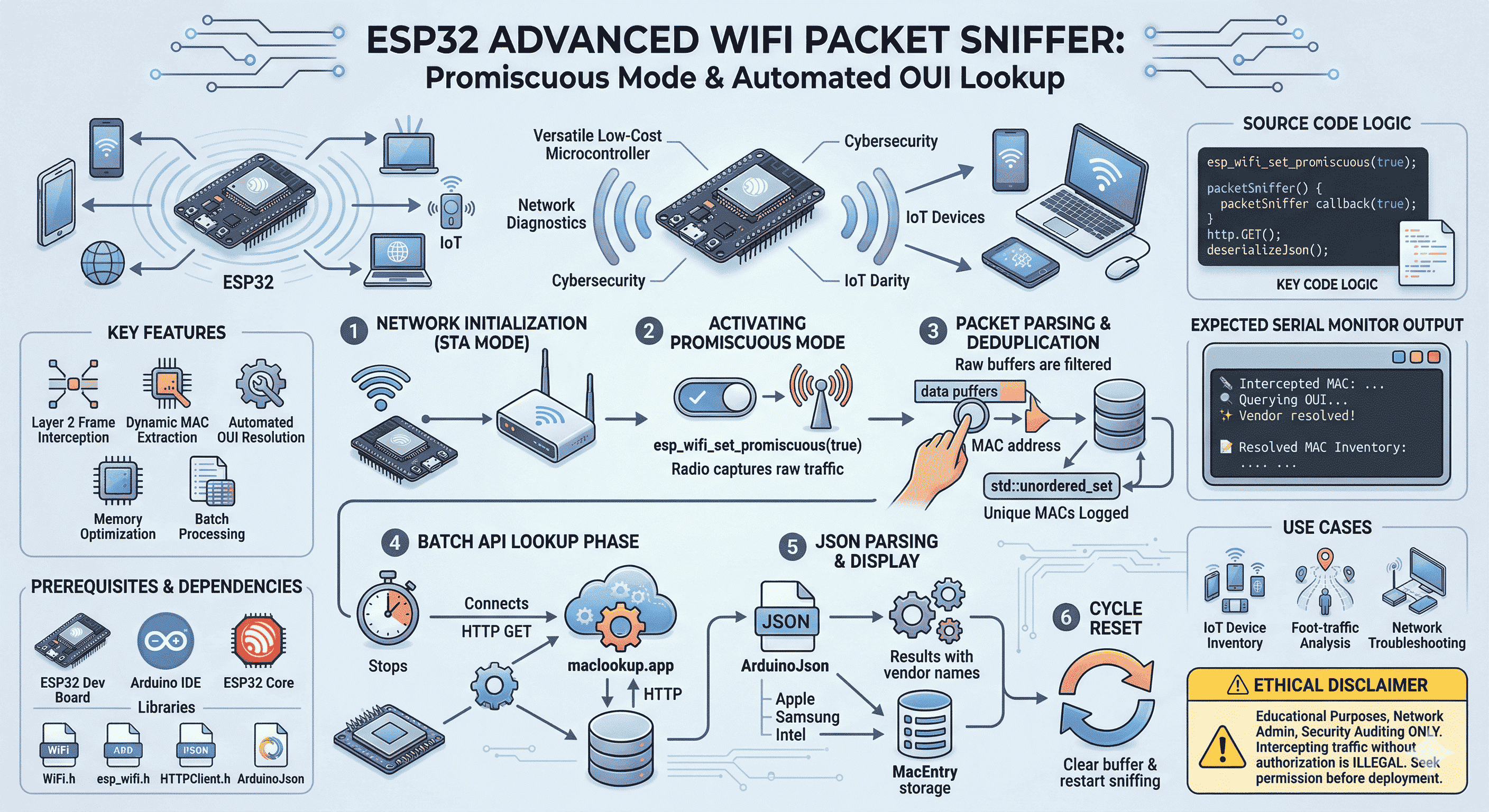
The ESP32 is an inexpensive microcontroller with on-board Wi‑Fi and Bluetooth. This project uses promiscuous mode so the radio can pass raw 802.11 frames to your code, extracts source MAC addresses, and calls a small HTTP API to show vendor names (OUI lookup). That is useful for labs, inventory, and learning how Wi‑Fi looks on the air.
What this article covers: enabling promiscuous RX on ESP32, deduplicating MACs, batching API calls, and staying on the right side of ethics and law.
The idea in plain language
Normally a Wi‑Fi interface drops frames that are not addressed to it. Promiscuous mode turns that filter off (within chip limits) so a callback receives more of what is in the air. From each buffer you can read bytes that correspond to MAC addresses, build a unique list, and only then query an online database that maps the first bytes of a MAC (OUI) to a manufacturer.
The firmware alternates between “listen for a while” and “pause, resolve vendors, print, clear, repeat” so Serial stays readable and you do not hammer the API.
What you get at the end
Layer 2 visibility without joining a network as the main goal (you still use STA mode here because the sketch uses the internet for lookups).
Stable MAC list using hash sets so each address is processed once per cycle.
Vendor labels from a JSON API (maclookup.app in the example).
Libraries: built-in WiFi, HTTPClient, esp_wifi; add ArduinoJson from the Library Manager.
How the sketch is organized
Connect in WIFI_STA and wait for an IP (needed for HTTP in this design).
Call esp_wifi_set_promiscuous(true) and register esp_wifi_set_promiscuous_rx_cb.
In the callback, parse the buffer, format a MAC string, insert into a set if new, print a short line on Serial.
When a timer fires, turn promiscuous mode off, iterate MACs, GET the API, parse JSON, collect matches.
Print a summary, clear the sniff set, restart the timer, enable promiscuous mode again.
tip
802.11 frame layouts differ by type; the sample uses a fixed byte offset to keep the example short. Treat it as a learning aid: validate offsets with real captures if you depend on them.
Use this only for education, your own network, home labs, or authorized security work. Capturing or analyzing radio traffic without permission can be illegal. Do not deploy in offices, schools, or public spaces unless you have clear written authorization and follow local law.
Next steps
If you outgrow the fixed offset, pair this with proper frame parsing or PCAP-style logging. You can also cache OUIs locally to reduce API use. Whatever you build, keep purpose and permission explicit. That is what makes the project genuinely useful instead of risky.
How Apple’s AASA file powers Universal Links: where to host the JSON, why HTTPS is non‑negotiable, and how to read it from a security angle, without the myths.
Turn an ESP32 into a Layer‑2 Wi‑Fi sniffer: capture MACs in promiscuous mode, dedupe with a hash set, then resolve vendors via a MAC/OUI API (ethics included).
Keyword + FAISS semantic search over CVE text, NVD enrichment, and structured DeepSeek analysis, with validation loops. Full architecture, stack, workflow, and source appendices.